Runtime Modes
RivetKit supports two runtime modes for running your actors:
- Runner: Default mode. Runs your actors as a long-lived process that connects out to Rivet. Used for local development and most deployments.
- Serverless: Responds to HTTP requests from Rivet and scales automatically. Used for serverless platforms (Vercel, Cloudflare Workers, etc.) and set automatically by Rivet Compute.
Runner
Runner is the default mode. Your app runs as a long-running process that opens a persistent connection out to the Rivet Engine, ready to run actors. The mode is named envoy internally, and it is active whenever RIVETKIT_RUNTIME_MODE is unset, so no configuration is needed for local development or standard deployments.
When to Use Runner
- Local development: The default when
RIVETKIT_RUNTIME_MODEis unset. - Containers, VMs, and bare metal: Long-running hosts such as Railway, Hetzner, Kubernetes, and AWS ECS.
- No public endpoint: Your app connects out to Rivet, so it does not need to be publicly reachable or registered in the dashboard.
- Custom scaling: You control how runner processes are pooled and scaled.
Example
import { actor, setup } from "rivetkit";

const myActor = actor({ state: {}, actions: {} });
const registry = setup({ use: { myActor } });

registry.startEnvoy();
The runner runs in the background, ready to run actors.
Architecture
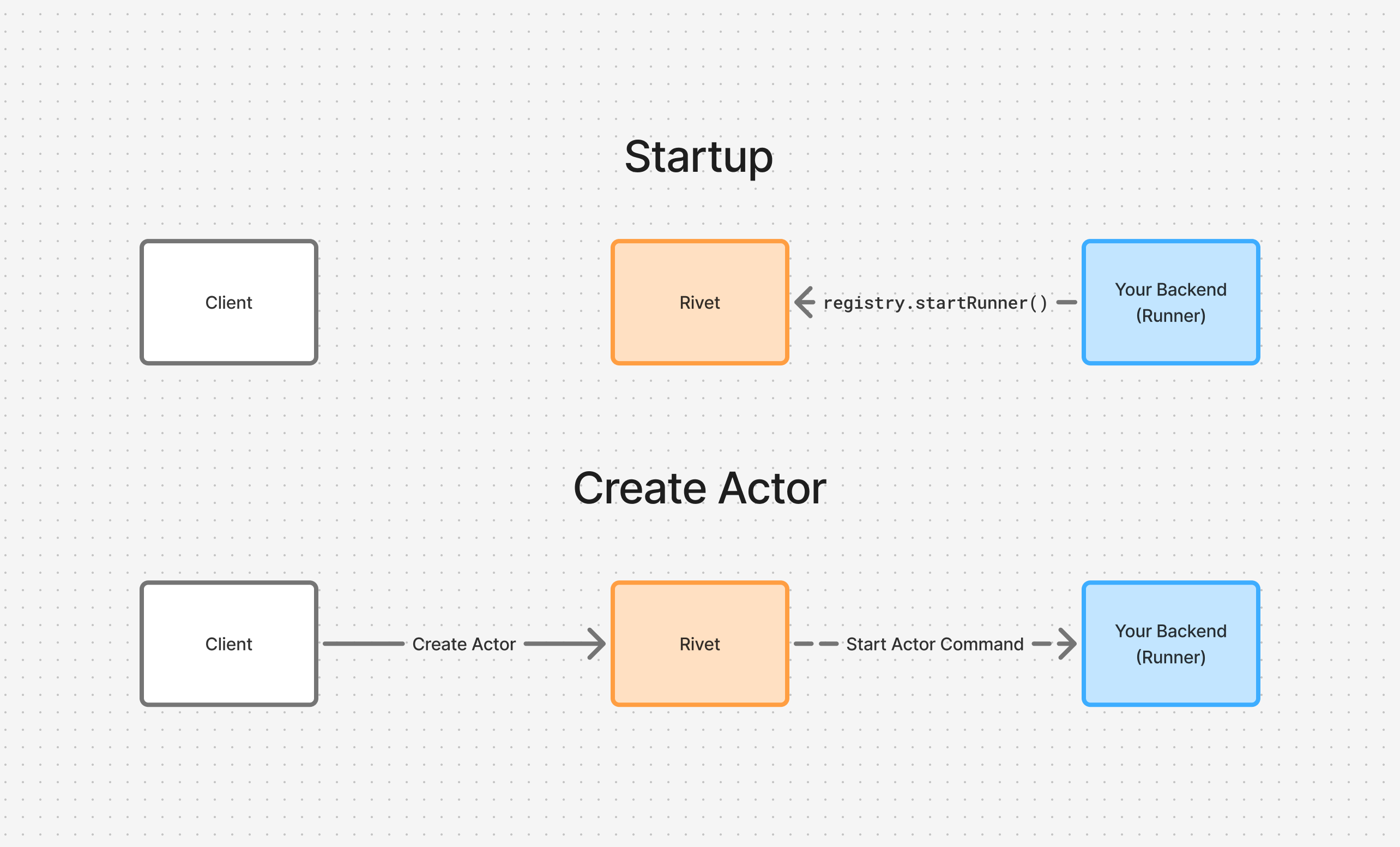
On startup, your backend calls registry.startEnvoy() (or registry.start(), which selects Runner mode by default) to open a persistent connection to the Rivet Engine. When a client creates an actor, the engine sends a command through this connection to start the actor on your backend.
Configuration
Runner Pool
Use RIVET_POOL to assign runners to a pool. This lets you control which runners handle specific actors.
RIVET_POOL=gpu-workers
import { actor, setup } from "rivetkit";

const myActor = actor({ state: {}, actions: {} });

const registry = setup({
  use: { myActor },
  envoy: {
    poolName: "gpu-workers",
  },
});
See Pool Configuration for how pools are scaled, drained on version upgrades, and rate-limited during actor eviction.
Serverless
Serverless runs actor logic in response to HTTP requests from Rivet, allowing your infrastructure to scale automatically. It is used on serverless platforms and is set automatically by Rivet Compute, which sets RIVETKIT_RUNTIME_MODE=serverless on deploy.
Benefits
- Platform support: Works with serverless platforms (Vercel, Cloudflare Workers, etc.)
- Scale to zero: No cost when idle
- Edge deployments: Easier to deploy to edge locations
- Preview deployments: Integrates with preview deployments on platforms like Vercel and Railway
- Efficient autoscaling: Request-based autoscaling can be faster and more efficient than CPU-based autoscaling depending on the platform
Example
import { actor, setup } from "rivetkit";

const myActor = actor({ state: {}, actions: {} });
const registry = setup({ use: { myActor } });

export default registry.serve();
import { Hono } from "hono";
import { actor, setup } from "rivetkit";

const myActor = actor({ state: {}, actions: {} });
const registry = setup({ use: { myActor } });

const app = new Hono();
app.all("/api/rivet/*", (c) => registry.handler(c.req.raw));

export default app;
See Server Setup for more configuration options.
Architecture
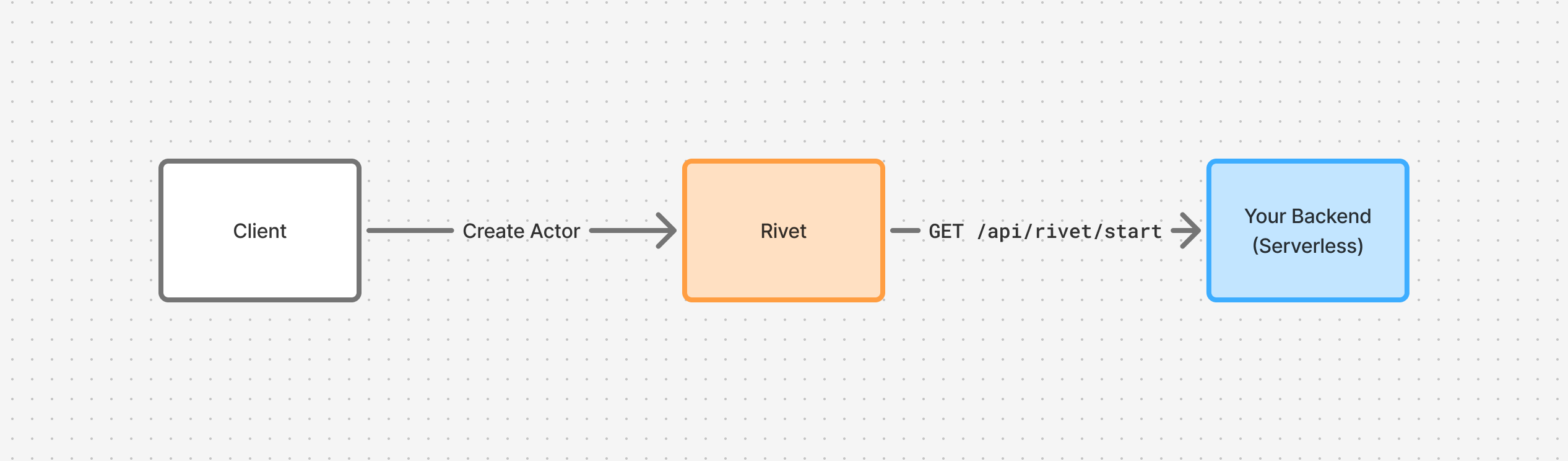
When a client creates an actor, it sends a request to the Rivet Engine. The engine then calls GET /api/rivet/start on your serverless backend to run the actor.
Advanced
Endpoints
Rivet exposes the following endpoints:
GET /api/rivet/metadata: Validates configurationGET /api/rivet/start: Runs an actor
You should never call these endpoints yourself, this is included purely for comprehension of how Rivet works under the hood.
Timeouts
Serverless platforms like Vercel have function timeouts. Rivet handles this automatically by migrating actors between function invocations, preserving state through ctx.state. Write your code as if it runs forever, Rivet handles the rest.
Read more about how we handle timeouts.
Shutdown Sequence
Each serverless request has a configurable lifespan (requestLifespan, default: 60 minutes). Set this to match your platform’s function timeout (e.g. requestLifespan: 3600 for Vercel Pro).
When the request nears its lifespan, the engine reserves a grace period (serverless_drain_grace_period, default: 10 seconds) at the end to gracefully stop actors. For example, with a 3600-second lifespan, actors begin stopping at 3590 seconds. After the full lifespan elapses, the connection is forcibly closed and any remaining actors are rescheduled.
See Limits for configuration details.
Comparison
| Mode | Method | Use Case |
|---|---|---|
| Runner | registry.startEnvoy() | Default. Long-running process that connects out to Rivet; no HTTP endpoint. |
| Auto | registry.start() | Selects Runner by default; binds an HTTP listener and serves static files when RIVETKIT_RUNTIME_MODE=serverless. |
| Serverless | registry.serve() | Fetch handler for serverless platforms. |
| Serverless | registry.handler() | Integrating with existing routers (Hono, Elysia, etc.). |